Get More from Your Google LSA Text Us at (628) 228-6704
0 like 0 dislike
422 views
by Marketing Guru (9.0k points)

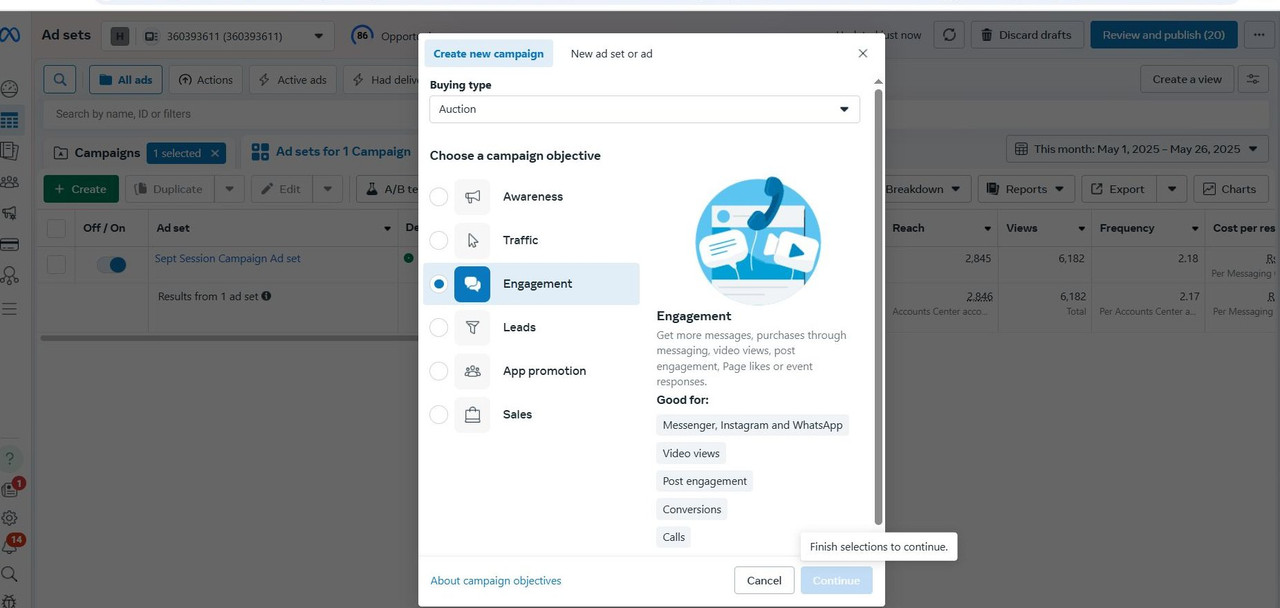
Can anyone help me to figure out the problem as i got to know, we need to add another ad in same campaign/ or ad set its good as algorithm works well this way. 

But whenever i try and click in create. it shows like this even though i select and click but it shows like this or show the red button sign; prohibited
1 Answer

0 like 0 dislike
by Marketing Guru (8.8k points)

The issue in your screenshot is due to an incomplete selection when creating the campaign/ad.

Here’s what’s happening and how to fix it:

If you just want to add another ad to the same campaign/ad set:

  1. Don't click “Create” at campaign level.
    That starts a whole new campaign.

  2. Instead, go to:

    • Select the existing campaign.

    • Go to the “Ad Set” tab.

    • Click into the existing ad set.

    • Click the green “Create Ad” button from inside that ad set.

  3. This opens a fresh ad within the same setup — no need to select campaign objective again.

    Note: If You See the Red “Prohibited” Symbol, it usually means a required step is skipped or a permission/account error.

Join a specialized Q&A site for digital marketing experts focused on ad platforms like Google, Facebook, YouTube, LinkedIn, Bing, Quora, and more. Connect with peers to share strategies on client retention beyond acquisition. Discuss and solve technical, managerial, or general challenges to improve your ad campaigns and client relationships.

Register to unlock your digital marketing potential!
Get More from Your Google LSA
Text Us at (628) 228-6704
...